
kUSRP 사용설명서User Manual · Windows
← kUSRP 홈 (다운로드 · 개발이력 · Q&A)← kUSRP home (download · history · Q&A)
1.개요 및 특징Overview & Features
kUSRP for Windows는 DS5QDR(이헌민)이 개발한 PC용 디지털 음성 클라이언트입니다. 주요 특징은 다음과 같습니다.
kUSRP for Windows is a PC digital voice client developed by DS5QDR (Heonmin Lee). Key features include:
- 멀티모드 직접 접속 — STFU·D-STAR·NXDN·P25·YSF·M17·ASL·EchoLink를 이 PC에서 바로 연결 (DVSwitch 서버 불필요) Direct multi-mode connection — STFU, D-STAR, NXDN, P25, YSF, M17, ASL and EchoLink straight from this PC (no DVSwitch server)
- 소프트웨어 코덱 — AMBE+2(vocoder_plugin), D-STAR AMBE(libdstar), IMBE(libimbe), Codec2, GSM, μ-law를 모두 소프트웨어로 처리 — ThumbDV 같은 하드웨어 동글 불필요 Software codecs — AMBE+2 (vocoder_plugin), D-STAR AMBE (libdstar), IMBE (libimbe), Codec2, GSM and μ-law all in software — no hardware dongle such as a ThumbDV
- 헤더 모드 메뉴 · ★ Favorite — 모드 버튼(▾)으로 모드를 바꾸고, ★ 버튼으로 지금 모드의 즐겨찾기 목록을 바로 편집 Header mode menu · ★ Favorite — switch modes with the mode button (▾) and edit the current mode's favorites with the ★ button
- 교신 중 TG/REF 변경 — 통화 중에도 다른 TG 또는 REF로 즉시 전환 가능 Change TG/REF mid-QSO — switch instantly, even during an active transmission
- LastHeard 실시간 — MQTT 기반으로 구독 TG/REF의 교신 이력을 실시간 표시 Real-time LastHeard — MQTT-based live QSO history for subscribed TGs/REFs
- QRZ·국기 자동 표시 — 수신국의 사진과 국기, 이름, 주소를 자동으로 불러와 표시 Auto QRZ / Flag display — automatically loads the receiving station's photo, flag, name, and address
2.파일 구성File Structure
kUSRP는 단일 실행파일(kUSRP.exe) 배포를 기본으로 합니다. 배포 ZIP을 풀면 아래와 같은 구성입니다.
kUSRP is distributed as a single executable (kUSRP.exe) by default. Extracting the release ZIP gives the following structure.
| 파일/폴더File / Folder | 역할Role | 비고Notes |
|---|---|---|
| kUSRP.exe | 메인 프로그램Main program | Nuitka 빌드 결과Nuitka build output |
| kusrp.ini | Callsign, DMR ID, 모드별 계정, 모드별 목록, OPTION 설정Callsign, DMR ID, per-mode accounts and lists, OPTION settings | 없으면 첫 실행 때 기본값으로 만들어짐Created with defaults on first run if missing |
| lib/*.dll | 코덱 DLL — vocoder_plugin·voc_wrap(AMBE+2), libdstar(D-STAR), libimbe(P25), libcodec2(M17), libgsm(EchoLink)과 라이선스·소스 파일Codec DLLs — vocoder_plugin · voc_wrap (AMBE+2), libdstar (D-STAR), libimbe (P25), libcodec2 (M17), libgsm (EchoLink), plus license and source files | exe에 내장됨 — kUSRP.py를 소스로 실행할 때만 필요Bundled into the exe — needed only when running kUSRP.py from source |
| Hosts/* | 리플렉터·노드 주소 목록 (D-STAR, NXDN, P25, YSF, M17, AllStarLink 노드 DB)Reflector / node address lists (D-STAR, NXDN, P25, YSF, M17, AllStarLink node DB) | 실행 시 24시간마다 pistar.uk·refcheck.radio·radioid.net·allstarlink.org에서 자동 갱신Auto-refreshed every 24h from pistar.uk, refcheck.radio, radioid.net and allstarlink.org |
3.최초 실행 및 LOGIN 설정First Run & LOGIN Setup
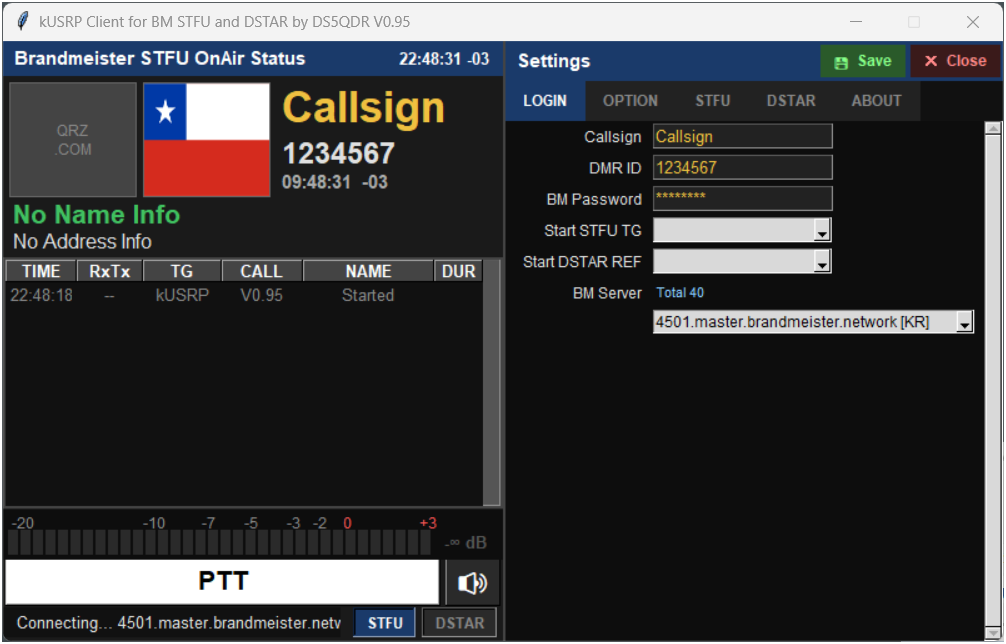
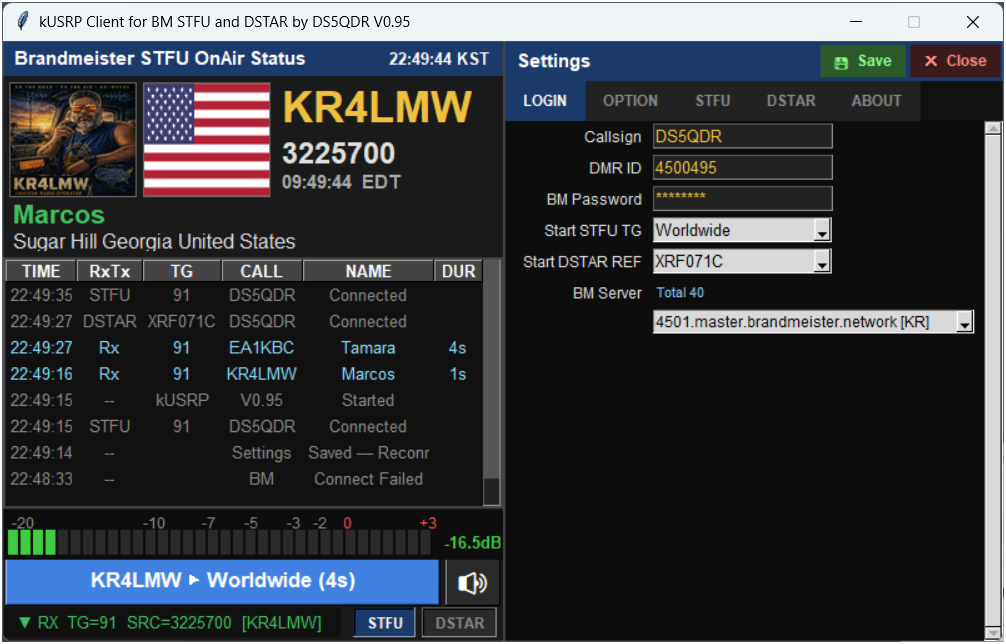
kUSRP.exe를 더블클릭하면 SETTINGS 창이 자동으로 열립니다. LOGIN 탭의 항목을 입력하고 SAVE를 클릭합니다.
Double-click kUSRP.exe. The SETTINGS panel opens automatically. Fill in the LOGIN tab and click SAVE.
- Callsign · DMR ID — 본인 호출부호(대문자)와 BrandMeister에 등록된 DMR ID Callsign · DMR ID — your callsign (uppercase) and BrandMeister-registered DMR ID
- BM Server · BM Password — 접속 마스터 서버(드롭다운, BrandMeister API 자동 로딩)와 Hotspot Password(brandmeister.network → 내 프로필) BM Server · BM Password — the master server (dropdown, auto-loaded from the BrandMeister API) and your Hotspot Password (brandmeister.network → your profile)
- EchoLink — 인증된 EchoLink 계정의 Password와 Location (콜사인 = LOGIN Callsign, 공개 프록시로 접속하므로 포트포워딩 불필요) EchoLink — Password and Location of your validated EchoLink account (callsign = LOGIN Callsign; connects via a public proxy, no port forwarding)
- ASL (your node via IAX2) — Node Host / Port(4569), Node / User(iaxclient), IAX Password — 내 AllStarLink 노드의 클라이언트 계정 ASL (your node via IAX2) — Node Host / Port (4569), Node / User (iaxclient), IAX Password — the client account on your AllStarLink node
- Mode menu — 헤더 모드 메뉴에 보일 모드. 새로 설치하면 STFU·DSTAR만 켜져 있습니다. Mode menu — modes shown in the header mode menu. A fresh install enables only STFU and DSTAR.
4.화면 구성 설명Screen Layout
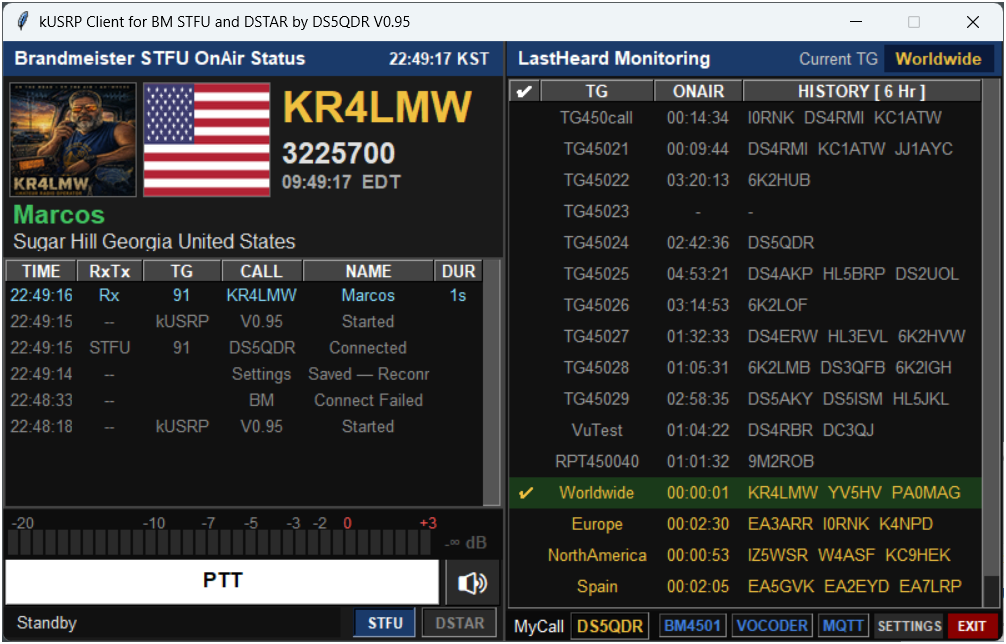
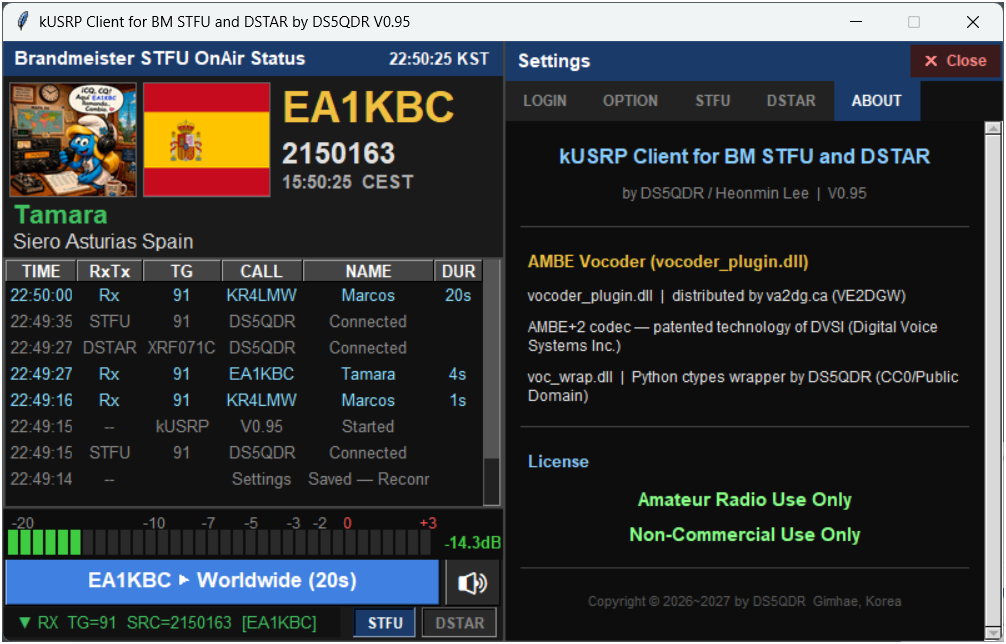
kUSRP는 좌측(On Air 상태)과 우측(LastHeard 모니터링) 두 패널로 구성됩니다. 모드에 따라 패널 제목과 일부 컬럼 명칭이 자동으로 바뀝니다.
kUSRP has two panels: the left (On Air status) and right (LastHeard monitoring). Panel titles and some column labels switch automatically depending on the mode.
왼쪽 패널 — On Air StatusLeft Panel — On Air Status
| 영역Area | 내용Content |
|---|---|
| 타이틀Title | 모드에 따라 "Brandmeister STFU OnAir Status", "DSTAR Reflector OnAir Status", "NXDN Reflector OnAir Status", "EchoLink OnAir Status" 등으로 표시Shows "Brandmeister STFU OnAir Status", "DSTAR Reflector OnAir Status", "NXDN Reflector OnAir Status", "EchoLink OnAir Status", etc., depending on mode |
| QRZ 사진Photo | 수신국 사진 자동 표시(정보가 없으면 NOINFO 이미지) · 클릭 시 QRZ.COM 페이지 열림Auto-loads the receiving station's photo (NOINFO image if unknown) · click to open its QRZ.COM page |
| 국기Flag | 수신국 국기 · 클릭 시 BrandMeister 프로필 열림Country flag · click to open its BrandMeister profile |
| 콜사인·ID·시간Callsign / ID / Time | 수신국 콜사인(황금색) · DMR ID · 현지 시각Callsign (gold) · DMR ID · the station's local time |
| 이름·주소Name / Address | 수신국 이름(녹색) · 도시 · 국가Name (green) · city · country |
| 교신 로그QSO Log | TIME / RxTx / TG / CALL / NAME / DUR |
| VU 미터Meter | 세그먼트 음량 표시 + dB 수치 (RX=녹색, TX=파란색)Segment level meter + dB value (RX=green, TX=blue) |
| PTT 버튼Button | 클릭으로 송신 · 🔊 스피커 음소거 토글Click to transmit · 🔊 toggles speaker mute |
| 상태표시줄Status bar | Standby / ▼RX / ▲TX, 연결 상태 표시Shows Standby / ▼RX / ▲TX and the link state |
오른쪽 패널 — LastHeard MonitoringRight Panel — LastHeard Monitoring
| 영역Area | 내용Content |
|---|---|
| 제목바Title bar | 모드 버튼(예: STFU ▾) · ★(Favorite TGs 편집) · 현재 TG/REFMode button (e.g. STFU ▾) · ★ (edit Favorite TGs) · current TG/REF |
| LastHeard 목록list | ✔ / TG·REF / ONAIR / HISTORY |
| 하단 버튼바Bottom buttons | MyCall · 서버/REFserver / REF · 코덱codec · MQTT · SETTINGS · EXIT |
5.모드 선택 (멀티모드)Selecting a Mode (Multi-mode)
LastHeard 제목바의 모드 버튼(▾)을 클릭하면 모드 메뉴가 열립니다. 모드를 고르면 그 모드의 목록으로 바뀌고 마지막으로 쓰던 TG/REF/노드에 자동 접속합니다. 프로그램은 항상 STFU로 시작하며, 메뉴에는 LOGIN 탭 Mode menu에서 켠 모드만 보입니다.
Click the mode button (▾) on the LastHeard title bar to open the mode menu. Picking a mode switches to that mode's list and auto-connects to the TG/REF/node used last. The program always starts in STFU, and only the modes enabled under Mode menu in the LOGIN tab appear.
| 모드Mode | 접속 대상Connects to | 코덱 (상태바 표시)Codec (status-bar label) |
|---|---|---|
| STFU | BrandMeister DMR | AMBE+2 |
| DSTAR | XRF/XLX/DCS(DExtra) · REF(DPlus) 리플렉터XRF/XLX/DCS (DExtra) · REF (DPlus) reflectors | AMBE (libdstar) |
| NXDN · YSF | NXDN / YSF 리플렉터NXDN / YSF reflectors | AMBE+2 |
| P25 | P25 리플렉터P25 reflectors | IMBE |
| M17 | M17 리플렉터M17 reflectors | Codec2 |
| ASL | 내 AllStarLink 노드 (IAX2)your AllStarLink node (IAX2) | μ-law |
| EchoLink | EchoLink 노드 (공개 프록시)EchoLink nodes (public proxy) | GSM |
APP_LinkKick).
APP_LinkKick).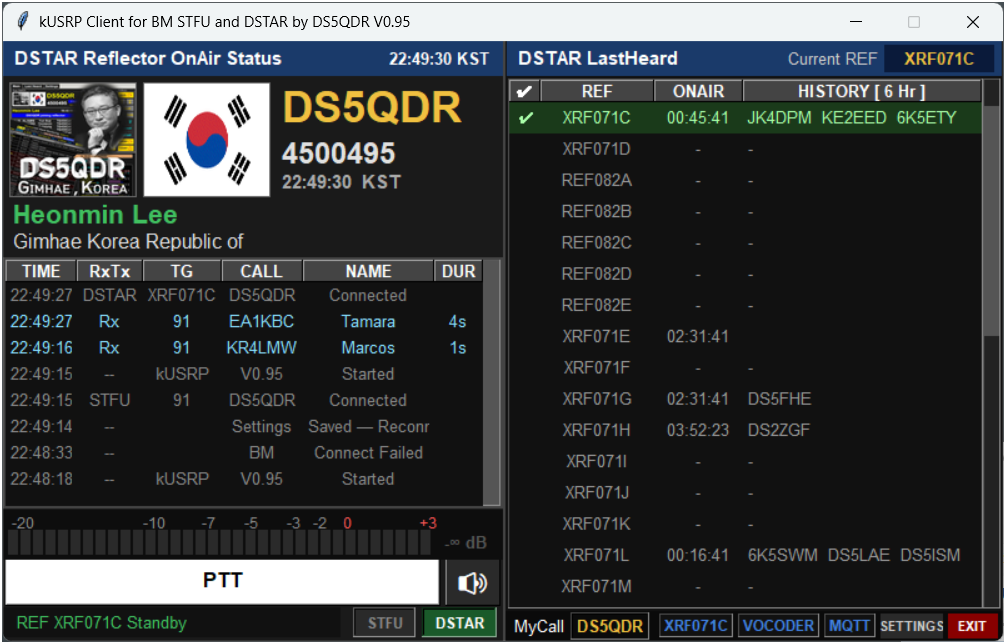
6.PTT 송신 조작PTT Transmit Operation
| 방법Method | 동작Behavior |
|---|---|
| PTT 버튼 클릭button | 마우스 Down → TX 시작 / Up → TX 종료Mouse Down → TX starts / Up → TX stops |
| 스페이스바Space bar | OPTION에서 PTT Space Key = True 설정 시 토글 방식으로 동작Acts as a toggle when PTT Space Key = True in OPTION |
7.TG/REF 전환 & LastHeard 모니터링TG/REF Switching & LastHeard
| 방법Method | 설명Description |
|---|---|
| LastHeard 행 클릭row click | 원하는 TG 또는 REF 행 클릭 → 즉시 전환Click the desired TG or REF row to switch instantly |
| Current TG/REF 입력input | 우측 상단 입력란에 번호 또는 키 이름 입력 후 EnterType a number or key name in the top-right field, then press Enter |
목록에 없는 TG/REF로 전환해도 자동으로 모니터링 목록에 추가됩니다. 영구 저장은 ★ 버튼 또는 SETTINGS → FAVORITE TGs 탭에서 합니다. Switching to a TG/REF not yet in the list adds it automatically. To save it permanently, use the ★ button or the SETTINGS → FAVORITE TGs tab.
LastHeard의 ONAIR 컬럼은 교신 중이면 콜사인, 종료 후에는 경과시간(HH:MM:SS)을 표시하고, HISTORY 컬럼은 설정된 시간 범위 내 최근 교신 콜사인 목록을 표시합니다(콜사인에 마우스를 올리면 이름·도시·국가 팝업 표시). The ONAIR column shows a callsign during an active QSO, or elapsed time (HH:MM:SS) once it ends; HISTORY lists recent callsigns within the configured time window (hover a callsign to see name, city, and country).
8.SETTINGS 상세 설정SETTINGS Details
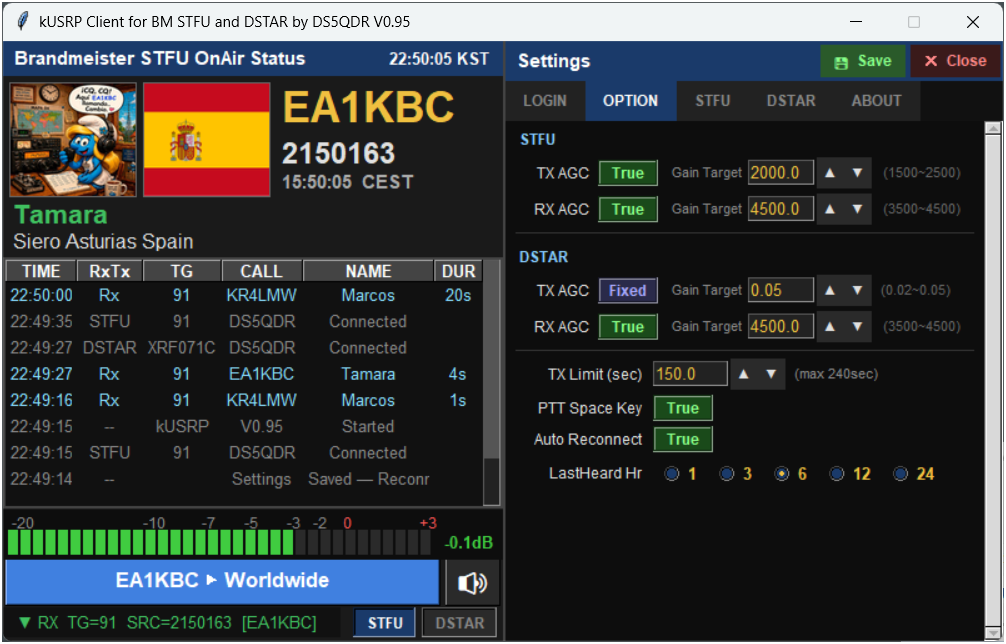
하단 SETTINGS 버튼을 클릭하면 LOGIN / OPTION / FAVORITE TGs / ABOUT 탭으로 구성된 설정 패널이 열립니다. (LOGIN은 3장 참고)
Click SETTINGS to open the settings panel, organized into LOGIN / OPTION / FAVORITE TGs / ABOUT tabs. (See section 3 for LOGIN.)
OPTION 탭Tab
| 항목Field | 설명Description |
|---|---|
| STFU TX / RX Gain | DMR(AMBE+2) 송신·수신 배율 (1.0 = 원음). NXDN·YSF도 같은 값을 씀DMR (AMBE+2) TX / RX multiplier (1.0 = raw); NXDN and YSF use the same values |
| DSTAR RX Gain | D-STAR 수신 배율 (1.0 = 원음). 송신 레벨은 libdstar가 자동으로 맞춤D-STAR RX multiplier (1.0 = raw); TX level is set by libdstar automatically |
| TX Limit (sec) | 최대 송신 시간, 10~240초(기본 150초)Maximum TX duration, 10–240s (default 150s) |
| PTT Space Key | 스페이스바 PTT 토글 사용 여부Enable spacebar as PTT toggle |
| Auto Reconnect | 접속 끊길 시 자동 재접속 여부Auto-reconnect on disconnect |
| LastHeard Hr | LastHeard HISTORY 표시 시간 범위(1/3/6/12/24시간)LastHeard HISTORY time window (1/3/6/12/24 hours) |
FAVORITE TGs 탭 (모드별 목록)Tab (lists per mode)
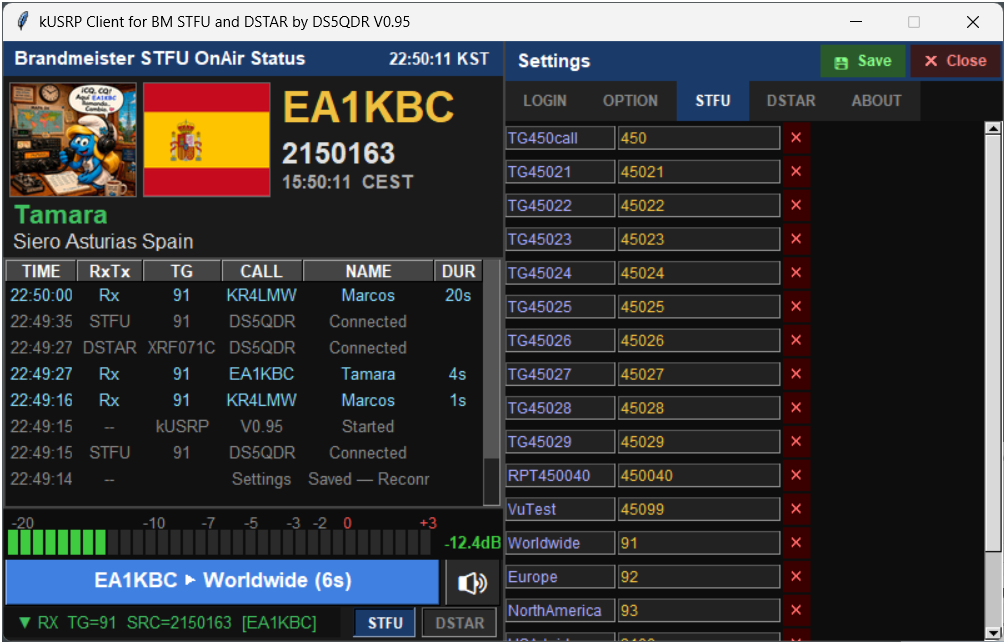
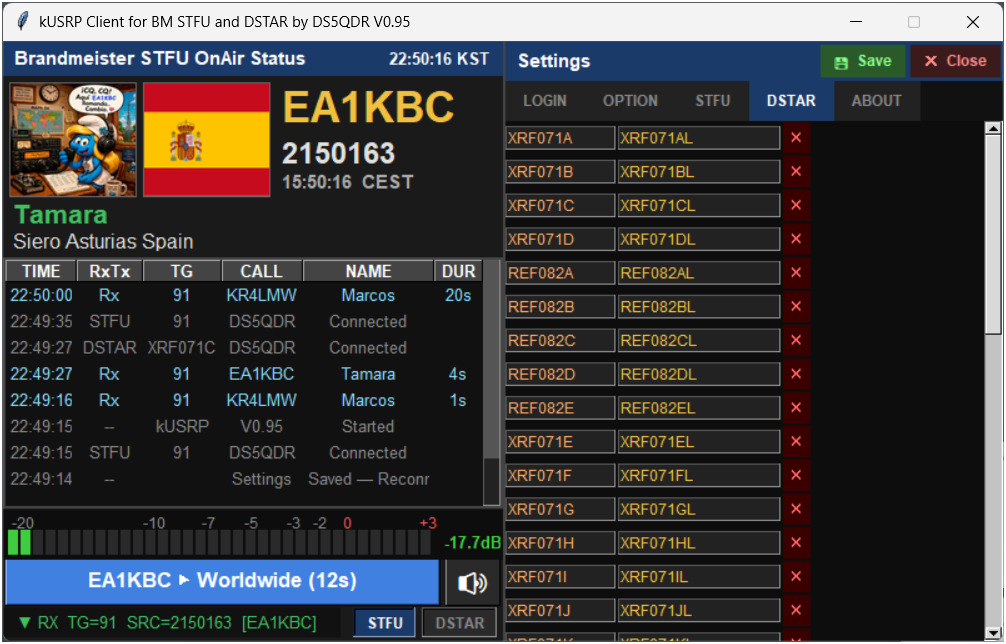
모드 버튼(STFU / DSTAR / NXDN / P25 / YSF / M17 / ASL / EchoLink)으로 목록을 고른 뒤, 각 행의 이름과 값(TG 번호 · 리플렉터 · 노드)을 편집합니다. Add를 누르면 빈 행이 추가되고 이름 칸부터 입력할 수 있으며(Tab으로 다음 칸), ✕로 삭제합니다. NXDN·P25·YSF·M17·ASL·EchoLink는 🔍 Search로 호스트 목록에서 찾아 클릭해 추가할 수 있습니다. 메인 화면의 ★ 버튼은 이 탭을 지금 모드로 바로 엽니다. Pick a list with the mode buttons (STFU / DSTAR / NXDN / P25 / YSF / M17 / ASL / EchoLink), then edit each row's name and value (TG number, reflector or node). Add inserts an empty row and focuses its name field (Tab moves to the next cell); ✕ deletes. For NXDN, P25, YSF, M17, ASL and EchoLink, 🔍 Search finds entries in the host lists and adds them with a click. The ★ button on the main screen opens this tab for the current mode.
D-STAR 행의 값은 리플렉터 + 모듈 + L(예: XRF071CL)이며, 실제 서버 주소는 Hosts\ 폴더에서 자동으로 찾습니다.
A D-STAR row's value is reflector + module + L (e.g. XRF071CL); the actual server address is looked up from the Hosts\ folder.
ABOUT 탭Tab
프로그램 버전, 내부·외부 IP, 코덱별 출처와 라이선스, DVSI 특허 고지, 프로토콜·데이터 출처, 업데이트 확인 버튼, 저작권 정보를 표시합니다. Shows the program version, internal / external IP, the source and license of each codec, the DVSI patent notice, protocol and data sources, a Check for Updates button, and copyright information.
9.kusrp.ini 직접 편집Editing kusrp.ini
텍스트 에디터로 직접 편집할 수 있습니다. 반드시 UTF-8 인코딩으로 저장하세요. 프로그램이 저장할 때 항목을 모드별로 묶어 정리하고, 더 이상 쓰지 않는 예전 항목(DVS_*, ThumbDV*, VocoderDevice, StartSTFU/StartDSTAR 등)은 자동으로 지웁니다.
kusrp.ini can be edited directly in any text editor. Save it as UTF-8. When the program saves, it groups keys by mode and automatically removes obsolete keys (DVS_*, ThumbDV*, VocoderDevice, StartSTFU/StartDSTAR, etc.).
[LOGIN]
; ── Common ──
Callsign = DS5QDR
DmrId = 4500495

; ── STFU ──
BMServer = 4501.master.brandmeister.network
BMPW = xxxxxxxx

; ── NXDN ──
NXDN_Id = 1234

; ── ASL ──
ASL_Host = my-node.ddns.org
ASL_Port = 4569
ASL_Node = 54866
ASL_User = iaxclient
ASL_Pass = xxxxxxxx

; ── EchoLink ──
EchoLink_Password = xxxxxxxx
EchoLink_Location = Gimhae, Korea

; ── Mode menu ──
Menu_APP = STFU,DSTAR

[OPTION]
; ── Common ──
TxTime = 150
PTTtoggle = False
Autorecon = True
LastHeardHr = 3
ShowMyInfoTx = True

; ── STFU ──
STFU_Rx_gain = 1.0
STFU_Tx_gain = 1.0

; ── DSTAR ──
DSTAR_Rx_gain = 1.0

; ── Last TG / REF / Node per mode ──
Last_STFU = TG450call
Last_DSTAR = XRF071C

[STFU]
TG450call    = 450
Worldwide    = 91

[DSTAR]
XRF071C = XRF071CL
REF082C = REF082CL

[NXDN]
Korea_NXDN = 45000

[M17]
M17-182A = M17-182A

[ASL]
ASL54866 = *354866

[ECHOLINK]
ECHOTEST = 999910.상태바 & 사진·국기 링크Status Bar & Photo/Flag Links
| 버튼Button | 의미Meaning |
|---|---|
| MyCall | 내 콜사인 표시Shows your callsign |
| 서버 / REFServer / REF | STFU는 BM 서버 번호(예: BM4501), 그 밖의 모드는 지금 접속한 TG/REF. 녹색=접속 OK, 빨강=접속 실패BM server number in STFU (e.g. BM4501), otherwise the connected TG/REF. Green = connected, red = failed |
| 코덱Codec | 지금 모드의 코덱 이름 — STFU·NXDN·YSF = AMBE+2, DSTAR = AMBE, P25 = IMBE, M17 = Codec2, ASL = μ-law, EchoLink = GSM. 녹색=정상, 빨강=오류(표시 전용, 클릭 기능 없음)The current mode's codec — STFU/NXDN/YSF = AMBE+2, DSTAR = AMBE, P25 = IMBE, M17 = Codec2, ASL = μ-law, EchoLink = GSM. Green = OK, red = error (display only, not clickable) |
| MQTT | 녹색=연결됨, 빨강=미연결Green = connected, red = disconnected |
QRZ 사진 영역을 클릭하면 qrz.com/db/{콜사인} 페이지가, 국기 이미지를 클릭하면 brandmeister.network의 해당 콜사인 프로필 페이지가 열립니다. 콜사인이 표시된 상태에서만 동작하며, 마우스가 손 모양(☞)으로 바뀌면 클릭 가능합니다.
Clicking the QRZ photo opens qrz.com/db/{callsign}; clicking the flag opens that callsign's brandmeister.network profile. Works only when a callsign is displayed — the cursor changes to a hand pointer (☞) to indicate the clickable area.
11.문제 해결Troubleshooting
| 증상Symptom | 원인Likely Cause | 해결 방법Fix |
|---|---|---|
| 접속 실패Connection fails | Callsign/DMR ID/Password 오류Wrong Callsign/DMR ID/Password | SETTINGS → LOGIN 재확인Re-check SETTINGS → LOGIN |
| 접속 실패Connection fails | UDP 포트 차단UDP port blocked | 공유기/방화벽 포트 설정 확인Check firewall / router port forwarding |
| 모드 메뉴에 모드가 없음Mode missing from the menu | Mode menu에서 꺼져 있음 (새로 설치하면 STFU·DSTAR만)Disabled under Mode menu (fresh install = STFU and DSTAR only) | SETTINGS → LOGIN → Mode menu에서 체크 후 SAVETick it under SETTINGS → LOGIN → Mode menu and SAVE |
| 코덱 표시 빨간색Codec label shows red | lib\ DLL 파일 누락 (소스 실행 시)Missing lib\ DLL files (when running from source) | lib\ 폴더 및 파일 존재 여부 확인Verify the lib\ folder and required files |
| 수신 음성 없음No audio on RX | 스피커 음소거 상태 / Windows 오디오 장치 미인식Speaker muted / audio device not detected | 🔊 버튼으로 음소거 해제, Windows 기본 오디오 장치 확인Click 🔊 to unmute; check Windows default audio device |
| MQTT 빨간색shows red | MQTT 브로커 접속 불가Cannot reach MQTT broker | 네트워크 확인(교신 자체는 가능)Check network (QSOs still work) |
| LastHeard 갱신 안 됨not updating | 목록에 TG/REF 없음No TG/REF in the list | ★ 또는 SETTINGS → FAVORITE TGs에 추가Add entries via ★ or SETTINGS → FAVORITE TGs |
| 리플렉터 접속 실패Reflector connect fails | Hosts\ 목록에 없음 또는 다운로드 실패Not in the Hosts\ list, or auto-download failed | 네트워크 확인 후 재시작(24시간마다 자동 재시도)Check network and restart (auto-retries every 24h) |
| EchoLink / ASL 접속 실패EchoLink / ASL connect fails | 계정 정보 오류 / 노드 포트(UDP 4569) 미개방Wrong account details / node port (UDP 4569) not open | LOGIN의 EchoLink Password(인증된 계정), ASL Node Host·Node·User·IAX Password 확인Check the EchoLink Password (validated account) and ASL Node Host, Node, User, IAX Password in LOGIN |
12.라이선스 안내License Notice
| 코덱Codec | 출처 · 라이선스Source · License |
|---|---|
| AMBE+2 — DMR / YSF / NXDN | vocoder_plugin.dll (va2dg.ca, VE2DGW) · voc_wrap.dll (DS5QDR, CC0) |
| D-STAR AMBE 3600x2400 — libdstar.dll | DroidStar mbe/imbe(AD8DP), mbelib(ISC), Pavel Yazev imbe_vocoder + QSO One D-Star 보정(DVSI 칩을 블랙박스로 측정, DVSI 펌웨어·코드 미사용) · GNU GPL v3 — lib/libdstar_src.zip, lib/DSTAR_CODEC_LICENSE.txtDroidStar mbe/imbe (AD8DP), mbelib (ISC), Pavel Yazev imbe_vocoder + QSO One D-Star fixes (measured on a DVSI chip as a black box; no DVSI firmware or code used) · GNU GPL v3 — lib/libdstar_src.zip, lib/DSTAR_CODEC_LICENSE.txt |
| IMBE — P25 (libimbe.dll) | OP25 imbe_vocoder (Pavel Yazev 2009) · GNU GPL v3 이상 — lib/imbe_vocoder_src.zipOP25 imbe_vocoder (Pavel Yazev 2009) · GNU GPL v3 or later — lib/imbe_vocoder_src.zip |
| Codec2 3200 — M17 | David Rowe (VK5DGR) et al. · LGPL-2.1 |
| GSM 06.10 — EchoLink | © 1992-1994 Jutta Degener, Carsten Bormann, TU Berlin |
| G.711 μ-law / IAX2 — ASL | RFC 5456 / Asterisk |
아마추어 무선 전용 · 비상업적 사용. GPL 부품(libdstar, libimbe)은 GNU GPL v3를 따르며 전체 소스가 lib/에 있고, 위 제한은 그 부품에 적용되지 않습니다. 무보증(AS IS)으로 제공됩니다.
Amateur radio use only · non-commercial use only. GPL components (libdstar, libimbe) remain under GNU GPL v3 with complete sources in lib/, and the restrictions above do not apply to them. Provided AS IS, without warranty of any kind.
프로토콜·참고: BrandMeister STFU · G4KLX ircDDBGateway, MMDVMHost, NXDN/YSF/P25Clients, MMDVM_CM, mrefd · DroidStar(AD8DP) · SvxLink echolib(SM0SVX) · Asterisk IAX2. 데이터: Pi-Star Host Files · DVRef/refcheck.radio · radioid.net · EchoLink 디렉터리 · AllStarLink 노드 DB. EchoLink®는 Synergenics, LLC의 등록상표, D-STAR는 JARL의 상표입니다. Protocols / references: BrandMeister STFU · G4KLX ircDDBGateway, MMDVMHost, NXDN/YSF/P25Clients, MMDVM_CM, mrefd · DroidStar (AD8DP) · SvxLink echolib (SM0SVX) · Asterisk IAX2. Data: Pi-Star Host Files · DVRef/refcheck.radio · radioid.net · EchoLink directory · AllStarLink node DB. EchoLink® is a registered trademark of Synergenics, LLC; D-STAR is a trademark of JARL.
Developer: DS5QDR · Heonmin Lee · Gimhae, Korea Developer: DS5QDR · Heonmin Lee · Gimhae, Korea